In brief: how a DIAS property transaction progresses
The steps shown above take place in the system as follows:
1. Fill in a purchase offer (optional) and the sales statement in Linear.
2. a. The agent fills in the DIAS property form (Fill in the property trade information)
b. The agent submits the completed form to the Property Transaction Service (KVP) (Confirm the information in KVP).
c. The Property Transaction Service immediately returns a draft deed of sale to the agent.
d. The agent sends the draft deed of sale and its attachments to the reviewer (if review is in use).
e. The reviewer returns the reviewed deed of sale approved.
f. The agent emails the deed of sale and its attachments to the sellers and buyers via Linear (Lähetä tarkastettavaksi ostajille ja myyjille)
Steps a–f can be repeated as many times as needed.
g. The agent sends the details to the banks for preparation (Lähetä kauppa pankkien valmisteluun)
3–4. During the preparation phase, the banks prepare the transaction on their end.
5–6. During the transaction phase, the agent starts the signing process (Start the signing phase):
- Authorisation phase signatures: must be completed within 24 hours of starting.
- Deed of sale signatures: must be completed within 30 days of starting.
- The agent can track signing progress in Linear.
General information about DIAS property transactions and prerequisites
In a DIAS property transaction, the deed of sale draft is not downloaded from Linear as in a traditional transaction. Instead, the Property Transaction Service (KVP) generates the deed of sale. A DIAS transaction is initiated by entering the transaction details on the DIAS form. However, you must first complete the sales statement as usual, where you can select DIAS. If an accepted purchase offer has been created for the listing in Linear, a lot of the information from the purchase offer is automatically populated on the DIAS property form.
Linear has full DIAS support, so you can start a DIAS transaction in Linear as long as the transaction otherwise meets DIAS prerequisites. DIAS and Linear are continuously developed, so you can also check the current prerequisites and limitations either on the purchase offer or in the sales statement via the info button above the DIAS field.
A DIAS transaction is not possible if the sale concerns an unseparated parcel (määräala). A prerequisite for selling a share of a property (määräosa) is that the subject property has a partition agreement (hallinnanjakosopimus) approved and registered by the National Land Survey of Finland, shown on the encumbrance certificate. If the property is subject to joint mortgages (yhteiskiinnitykset), the transaction cannot be completed in DIAS. A pending title registration (lainhuuto) may also prevent the sale of a share of a property.
Currently, DIAS transactions can be completed in Linear when:
- The subject of the transaction is one whole property or a share of a property.
- If the property or leasehold being sold is subject to mortgages, they must be electronic, and all mortgages must be in the name of the seller’s bank specified in the DIAS process (all in the same bank) (excluding mortgage deeds pledged as security for rent payments).
- The transaction can also proceed if the mortgages are in the seller’s name, provided that the seller cancels the mortgages in their name before the agent starts the transaction.
- The encumbrance certificate of the property being sold must not contain a restriction on the right of disposal (vallintarajoitus) or other notice information (e.g., attachment/enforcement entry, bankruptcy, dispute over title/ownership, surviving spouse’s right of possession, or a right of use based on a will).
- All sellers use the same bank (does not apply to a company’s authorised signatories).
- All buyers use the same bank (does not apply to a company’s authorised signatories).
- The buyers and sellers are legally competent private individuals or limited liability companies (not, for example, persons under guardianship, subject to enforcement, principals/mandators, or estates of deceased persons).
- All signatories to the transaction have personal online banking credentials or a mobile certificate.
- The transaction is completed with a single deed of sale.
- The transaction has a single payment instalment to which the transfer of title is tied.
- The listing is not a new development.
Note: The parties to the transaction may use different banks. In other words, a DIAS transaction is possible if, for example, the buyers use Nordea and the sellers use Aktia.
Note: A single DIAS transaction/deed of sale cannot be used to sell multiple properties or multiple property identifiers.
More detailed information about the prerequisites is also available in the DIAS support portal.
Drafting phase
Drafting a DIAS property transaction can be started at any time after the listing has been set to Reserved and the Sales statement has been completed, as the form can be saved as a draft and you can continue filling it in later.
The DIAS property form can be found on the Transaction tab, where drafting the deed of sale is started under Fill in the property trade information (step 2a).
Basic information
The basic details of the sale are automatically populated from the specification appendix, including the property identifier, the codes of the mortgage deeds, and the purchase price from the offer to purchase / closing statement. These fields can still be edited on the form if necessary.
If no contractual penalty is intended to be used, enter 0 in this field. If, however, a contractual penalty has been defined and the purchase price is not paid on the due date, the seller has the right to cancel the sale and claim the contractual penalty arising from the cancellation.
NOTE: Cancelling the sale requires either a cancellation agreement confirmed by a certified conveyancer or a legally binding court decision.
The seller’s and buyer’s bank details are selected from the bank list, which can also be searched by typing the bank’s name.
Seller information
The seller’s details are populated based on the information entered in the customer register (CRM), but they can be updated in the draft deed of sale (KVP) if needed.
NOTE: If the seller is a company requiring signatures from one or more authorised signatories, follow these steps: In addition to the company, add all signing individuals to the customer register (CRM) with their contact information and personal identity codes (if not already added). They must then be added on the DIAS form to the Sellers field as well as the Company signatories field. This creates a separate section for the signatories, showing their contact details. After this, set the field The person is not a party to the transaction but acts as an authorised signatory for the company to Yes.
Select whether the seller pays the commission invoice (e.g., brokerage fee) and define the seller’s share of the invoice total either as a percentage or as a euro amount. If there are multiple sellers, you can specify who pays the commission and divide the commission between the payers according to the client’s wishes.
NOTE: The amount automatically filled into the Total amount of the commission invoice field includes all accepted invoices addressed to the sellers under the listing (including brokerage fees and other costs). Please ensure that all costs are itemised on the invoice, no invoices have been paid in advance, and the shares are allocated correctly. If no accepted invoices are found for the listing, the Total amount of the commission invoice field will contain the brokerage fee (incl. VAT) from the closing statement.
NOTE: The invoice reference number is also automatically filled on the DIAS form from the accepted invoice. Alternatively, you can choose Message as the reference type, in which case the system will list all invoice numbers of the accepted invoices as the Message for the commission invoice.
NOTE: You do not need to attach the brokerage commission invoice to the DIAS form, but you may send it in advance to the sellers and explain that the bank will make the payment on their behalf during the DIAS process.
Persons granting consent can be added under the seller if necessary. Please note that in a DIAS transaction for a property, the spouse must give their consent in the KVP service before the parties can sign the deed of sale.
If there are multiple sellers, you must select on the DIAS form which seller is to receive the draft deed of sale first in the KVP once the deed approved by the parties has been sent to the banks for preparation. This selection can be found below all sellers.
Shares being transferred
Due to the Finnish National Land Survey’s (NLS) old registration practices, the title deed may show multiple owners registered under the same share. For example, according to the following example, half of the property is owned solely by Petteri Punakuono, and the other half jointly by Hillevi Hiiren Yritys and Petteri Punakuono, but without defined shares.
When selling an entire property via a DIAS transaction, the total of the shares being transferred must always be 1/1. A DIAS transaction can also be made for a fractional share of a property, in which case the ownership share is smaller and is entered as a fraction indicating each seller’s share of the entire property.
Buyer details
The buyer’s / buyers’ details are also pulled in automatically from the customer register, but they can still be edited on the DIAS form. Otherwise, the fields behave the same way as in the seller section.
Conditions of transfer
At the moment, property transactions have four statutory standard conditions that the KVP generates into the deed of sale automatically:
- General information about DIAS property transactions
- Transfer of title
- Payment of the purchase price
- Condition for the transfer of mortgage deeds
Other conditions can be selected by the agent from condition templates, or alternatively written out manually word for word.
In the condition templates, some conditions may offer multiple alternatives. Conditions found in an accepted offer (e.g. transfer-of-possession date, value of movables included in the purchase price, etc.) will automatically appear in the condition templates.
Once the conditions have been selected, you can still edit them freely on the form. You can review the deed of sale created by KVP with your selected conditions, and if needed, always return to edit the KVP draft.
The image below shows a couple of options for how conditions can also be attached as a separate document that is added to the KVP draft:
Attachments for the DIAS transaction
In the DIAS transaction attachments, you upload e.g. the conditions referred to in the Sales conditions section shown in the image above. However, the certificate of title and encumbrances is not attached here; it must be added later.
Additional details for the transfer notification
Intended use, Building information, and Plan information must be selected from a drop-down list whose values differ slightly from those shown on the property description attachment. For that reason, these values are not filled in automatically here.
Commission details
The information in the commission section is automatically populated from the company and user settings. However, it can be edited here.
NOTE: The commission details do not come from the invoice; they come from the company details.
At the bottom of the page, you can also specify which agent(s) will receive email notifications about the progress of the DIAS process. The listing’s agent and the person who fills in the DIAS form will always receive emails, but additional recipients can be added if needed.
When the form has been completed, click Mark as complete in the bottom-right corner.
After this, the information entered by the agent in the form is submitted to the Property Conveyance Service (KVP) (step 2b) by clicking Confirm the information in KVP. If the details (e.g. seller(s), property identifier and mortgage deeds) match the National Land Survey of Finland’s records exactly, the deed of sale draft will be returned immediately. If the details do not match NLS data, an error message will be shown.
You can then download the deed of sale draft (and its attachments) via the Deed of sale and attachments button (step 2c).
If the brokerage has an internal review process in use and enabled, the documents must at this stage be sent for internal review (steps 2d–e).
Next, the documents are sent to the sellers and buyers for review (step 2f). The parties will receive the documents by email either as attachments or as a link to the attachments, depending on how the agent has chosen to send them.
Finally, the transaction is sent to the banks for preparation (step g).
At this stage, you must attach the title and encumbrances certificates, dated the same day the listing is being sent to the banks for preparation. When naming the attachments (before adding them to the system), note that the file name must not contain Finnish characters (ä/ö/å) or special characters.
NOTE! Before the transaction is sent, DIAS automatically checks that the mandatory attachments added for bank preparation for property sales and leasehold-right sales are correct.
The change concerns the following attachments:
- Certificate of title
- Certificate of mortgages and encumbrances
- Certificate of leasehold right
- Certificate of mortgages and encumbrances (leasehold right)
- The attachments are dated with today’s date
- The document title matches the official document (e.g. Certificate of mortgages and encumbrances, not Data on charges)
- The property identifier or facility identifier matches the identifier on the document
The attachments are checked automatically, so they must be generated in a machine-readable format. DIAS cannot verify information from a copied or scanned printout. You can check the document format by testing whether the text can be selected (highlighted) before adding the attachment.
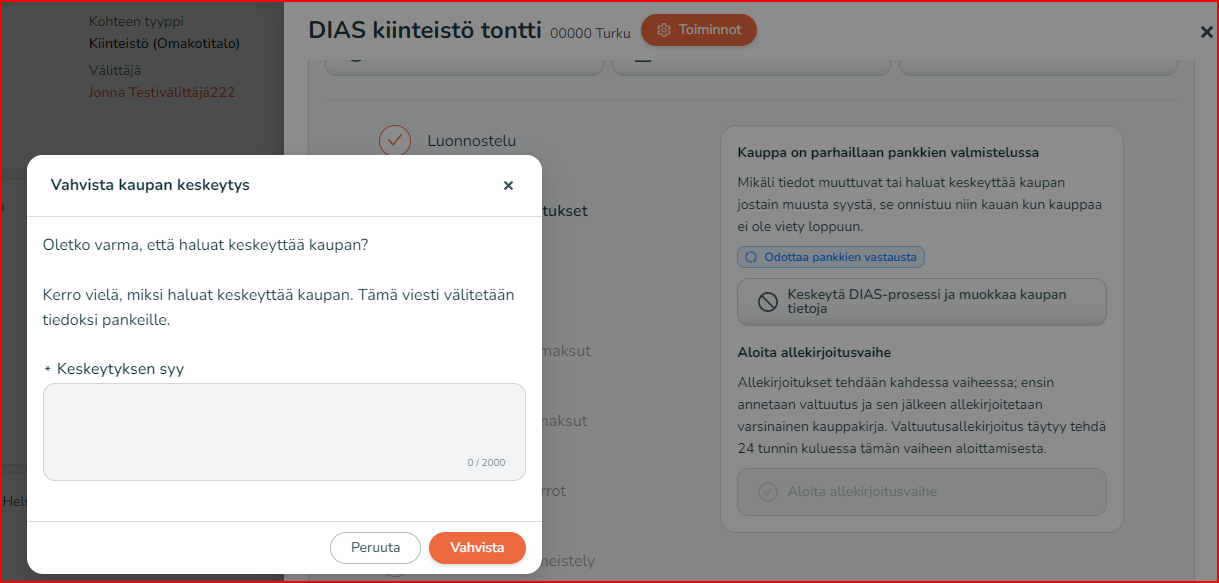
After sending, the agent can track the progress of the DIAS process in Linear. The parties are also automatically informed by email as the process advances. The agent can pause the process at any stage and start again from the beginning.
If you pause a DIAS transaction, you must record the reason for the interruption. When paused, the process returns to the beginning. Please note that the agent can no longer pause/cancel the transaction in Linear after the signing stage has been started.
 Preparation stage
During the preparation stage, the seller’s and buyer’s banks contact the parties and agree on the necessary actions related to the transaction. The seller’s bank agrees with its customer on matters such as repayment of any existing loans, rearranging collateral, and the payment flows related to the transaction. In addition, during the preparation stage the seller’s bank gives a commitment in DIAS to transfer the mortgage deeds listed by the agent. The buyer’s bank agrees the required matters with its customer and ensures that the loan is ready to be drawn down. In addition, the buyer’s bank goes through the details related to transfer tax with its customer, because in property or leasehold-right transactions the transfer tax information does not come from the agent. The buyer’s bank also checks the codes of the existing mortgage deeds listed by the agent and that all mortgage deeds have been listed in the transaction details. Any new mortgage deeds to be applied for are handled by the buyer’s bank outside DIAS. The banks mark the preparation stage as completed once, from the bank’s perspective, the transaction can proceed to signatures.
Trading / signing
The agent will receive an email notification (and will also see it in Linear) when the signing stage can be started.
Once the agent has started the signing stage, DIAS immediately sends signature invitations for the bank authorisations to the parties to the transaction. In a DIAS property transaction, the parties must always sign the required bank authorisations before signing the actual deed of sale.
After the agent has started the signing stage, the parties have 24 hours to sign the authorisations at asiointi.dias.fi. When all parties have signed the bank authorisations, the signing process moves from DIAS to KVP, where the parties sign the deed of sale one by one. The parties will receive an email invitation to sign the deed of sale. The parties have 30 days to sign the deed of sale at kiinteistoasiat.fi. In KVP, the seller always signs first, and only then the buyer. The KVP service fee is charged to the last signer, unless one of the previous signers has already paid it.
The agent can monitor the stages and status of the DIAS property transaction in Linear by clicking Events. More information about DIAS, such as the different stages of a property transaction and processing times, is also available in the DIAS customer support portal: https://asiakaspalvelu.dias.fi/hc/fi
Webinar recordings
Together with DIAS, we have organised webinars about DIAS transactions. You can watch the recordings of these trainings via the links below:
Getting to know DIAS transactions (properties):
https://vimeo.com/1117721066/ab0e1bcc24
Transfer of a leasehold right and an undivided share of a property as a DIAS transaction: https://vimeo.com/1006119539/64b0fe057c