In Linear, you can set time slots that prospective buyers can book for a private viewing directly from the listing on Oikotie. The agent defines the bookable slots on the listing card’s Viewings tab by selecting Add available times to be booked.
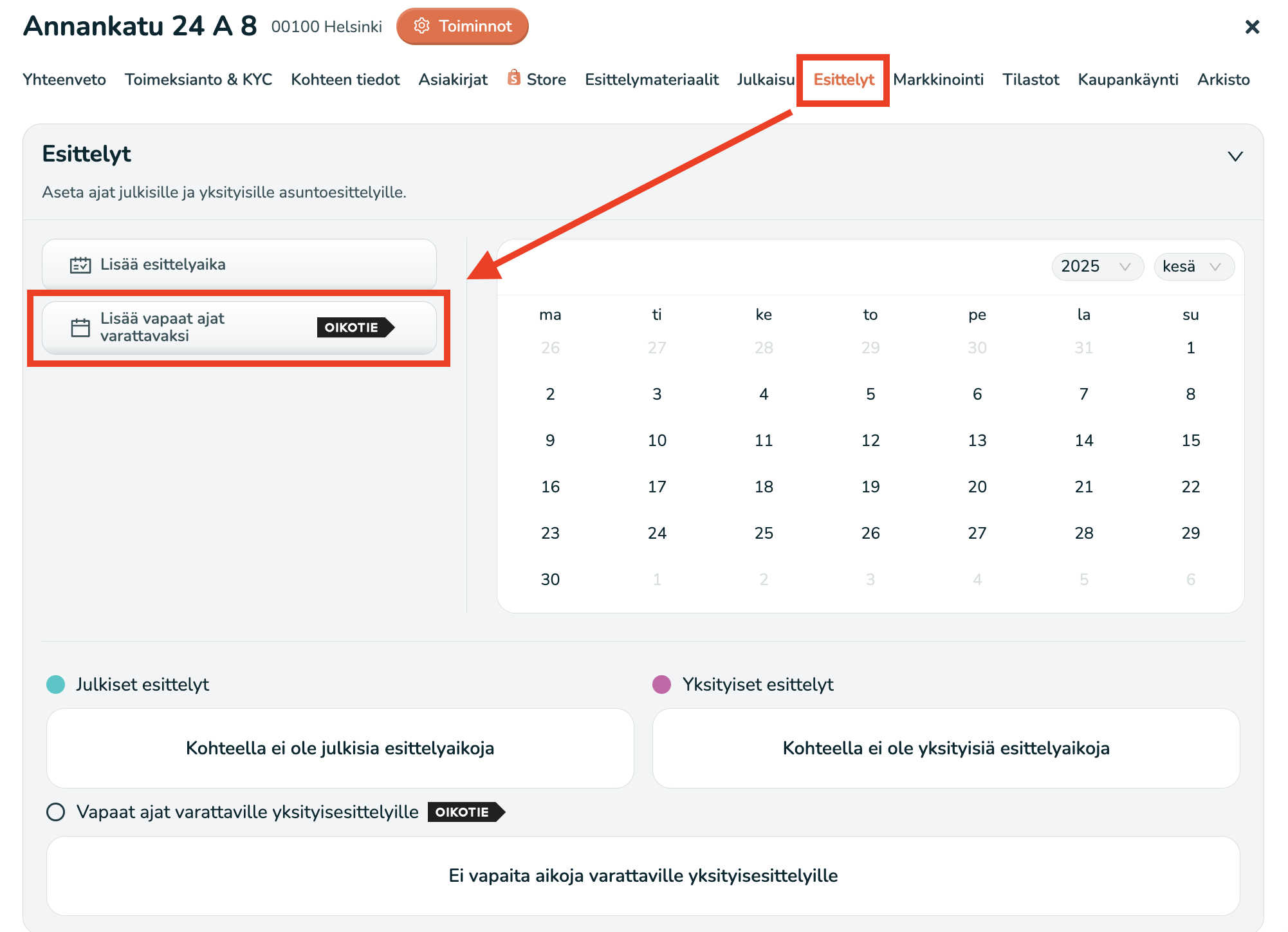 Adding a new bookable time
When you add bookable viewing times in Linear, fill in the following details:
- Presenter – Select the agent who will host the viewing. The booking will be created in this agent’s calendar.
- Viewing duration – Specify how long each individual viewing lasts.
- Time window(s) – Select the date and the start/end times within which private viewings can be scheduled, for example 28 Jun 2025 from 12:00 to 14:00. If you want, you can add multiple time windows at once so prospects have more options to choose from.
Finally, click Save to add the bookable private viewing times. The information will be updated on Oikotie after a short delay.
NOTE: The listing on Oikotie will not show any bookable viewing times if any of the following conditions are met:
- The viewing time is on the same day the time window was created. This prevents viewings from being created with too little lead time, protecting both the agent and the seller/landlord.
- The agent already has a viewing for another listing in Linear at the same time.
- The viewing time has already been booked. For example, if one customer has booked 28 Jun 2025 from 13:00 to 13:30, another customer cannot book the same time.
After you add a private viewing time that can be booked from the listing page on Oikotie, Linear will also create a so-called preliminary reservation in your calendar. This way, when you create a new event (such as a meeting or a viewing), you’ll also see the time slots that are already tentatively reserved for private viewings.
When a customer books a private viewing you’ve made available on Oikotie, you will receive an email notification from Linear. The email includes the key details of the booking, such as the listing address, the name of the person booking, and the time of the appointment. More detailed contact information becomes available in Linear once the booking has been saved.
Message automations for bookable private viewings
You can enable message automations for viewing times booked via Oikotie. Message automations are described in more detail in this article.
Of course, you don’t have to enable message automations—you can coordinate booked viewing times and any changes related to the viewings without automations. However, the purpose of automations is to reduce the agent’s workload in a busy day-to-day routine and ensure that all parties stay up to date.
In the message automation settings, you can enable the following messages for bookable private viewings:
- Viewing confirmation message to the client (seller/landlord).
- Viewing confirmation message to a prospective tenant.
- Viewing confirmation message to a prospective buyer.
- Viewing confirmation message to the current tenant.
- Viewing cancellation message to the client (seller/landlord).
- Viewing cancellation message to a prospective tenant.
- Viewing cancellation message to a prospective buyer.
- Viewing cancellation message to the current tenant.
- The hosting agent has changed.